
Commanders Act MCP Server: analyze your marketing data with Claude or ChatGPT
16/10/2026 |
Understand your tracking, explain a drop in conversions or spot new activation opportunities, simply by asking your AI assistant a question. That is what the Commanders Act MCP server makes possible. Your teams spend less time looking for information and more time making decisions.
What is an MCP server?
The Model Context Protocol (MCP) is an open standard. It lets AI assistants such as Claude or ChatGPT connect to applications and access their data.
The Commanders Act MCP server gives your AI assistant direct access to your environment: sources, destinations, enrichments, tag containers, reports and monitoring. The AI no longer answers from general knowledge, but from your actual configuration.
You ask your question in natural language. The assistant retrieves the relevant information and turns it into analyses, tables or visualizations, without a single line of code.
6 MCP server use cases for your marketing data
1-Map your marketing use cases with AI
Taking over an account or presenting your setup to a new team? Ask the AI to identify the use cases in place, such as server-side tracking, audience activation or consent management. For each one, it explains its business value and the connected platforms.
The benefit: a clear view of what your setup actually delivers, easy to share with every stakeholder.
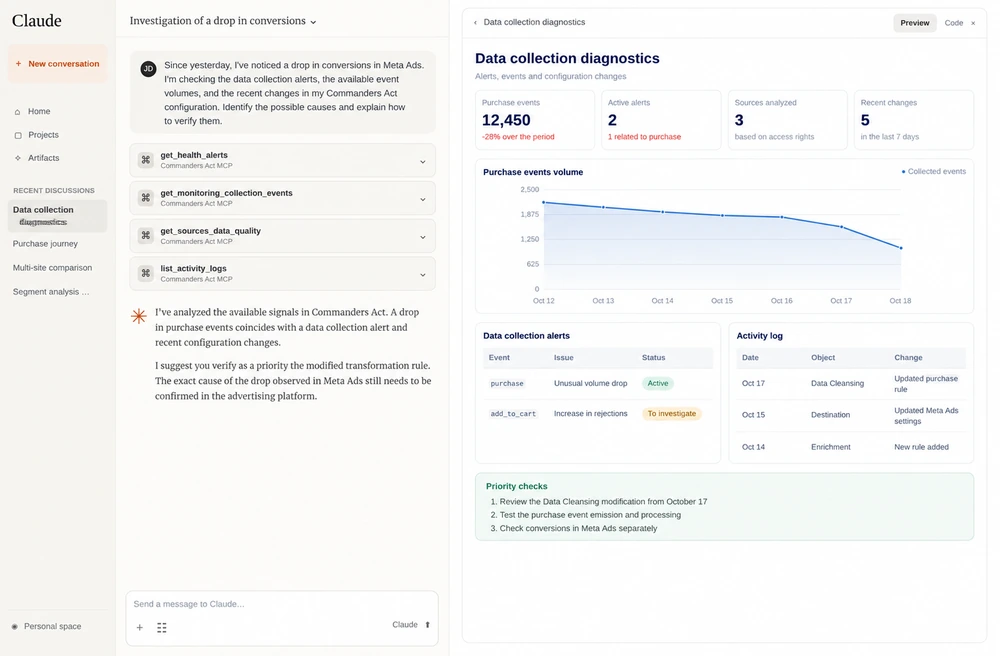
2- Diagnose a drop in conversions on Meta Ads
Conversions down since yesterday? The assistant reviews collection alerts, data quality and recent configuration changes. It then builds a timeline and a prioritized checklist.
The benefit: a structured investigation in minutes, to limit the impact on your campaigns.
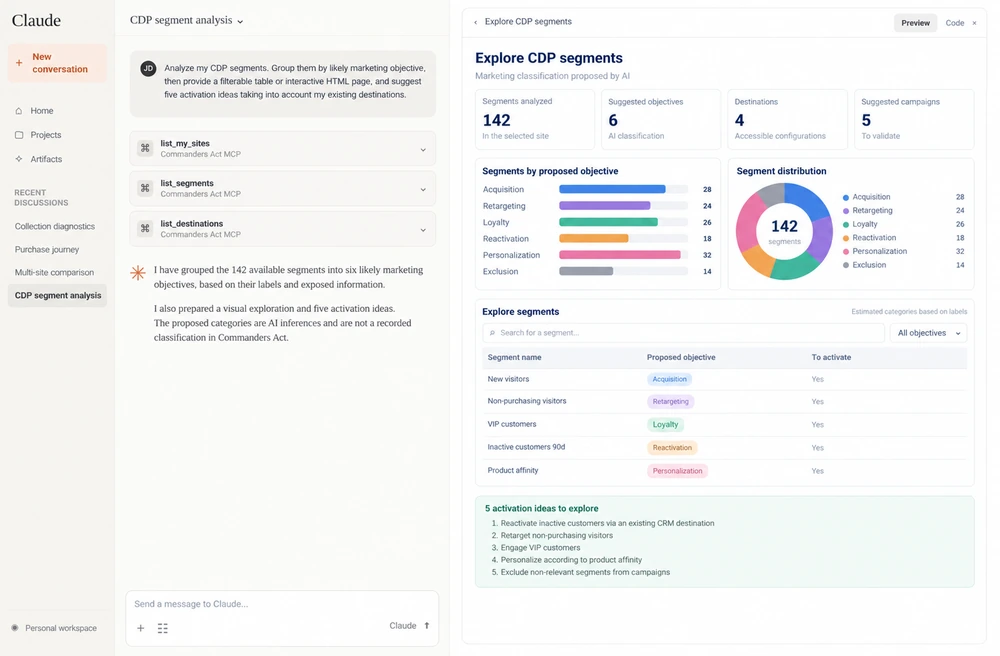
3- Unlock the full potential of your CDP audience segments
The AI groups your segments by objective: acquisition, retargeting, loyalty, reactivation. It can generate an interactive page to explore them and suggest new activation ideas based on your existing destinations.
The benefit: a segment inventory turned into a marketing action plan.
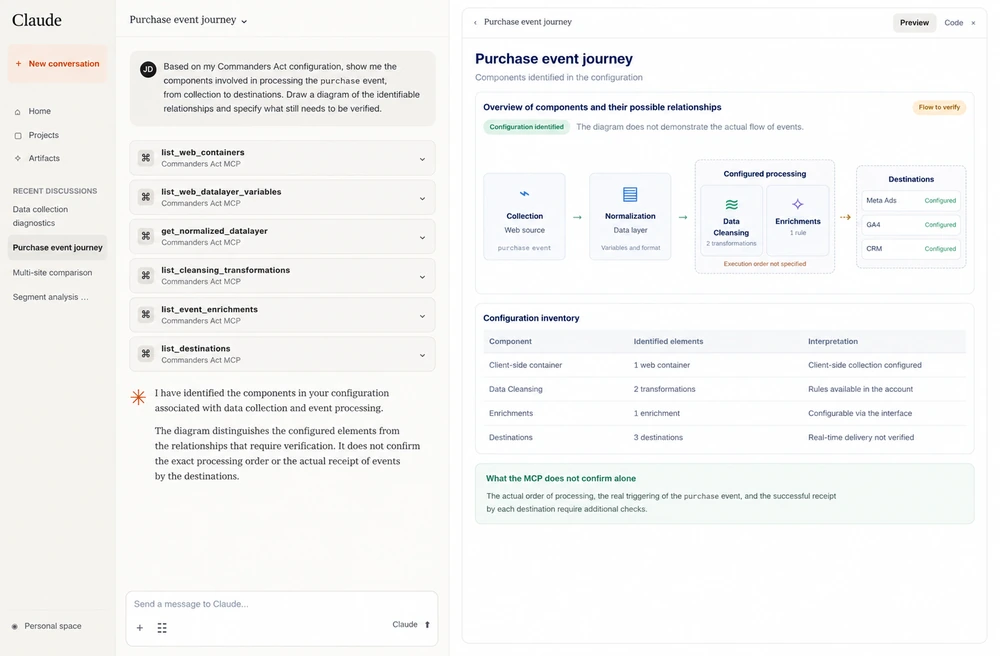
4- Visualize your purchase event journey, from collection to server-side
The assistant traces the path of the purchase event: collection, transformations, web or server-side tags, then marketing destinations. It produces a flow diagram and flags anything it cannot confirm.
The benefit: tracking documentation everyone can read, marketing and technical teams alike.
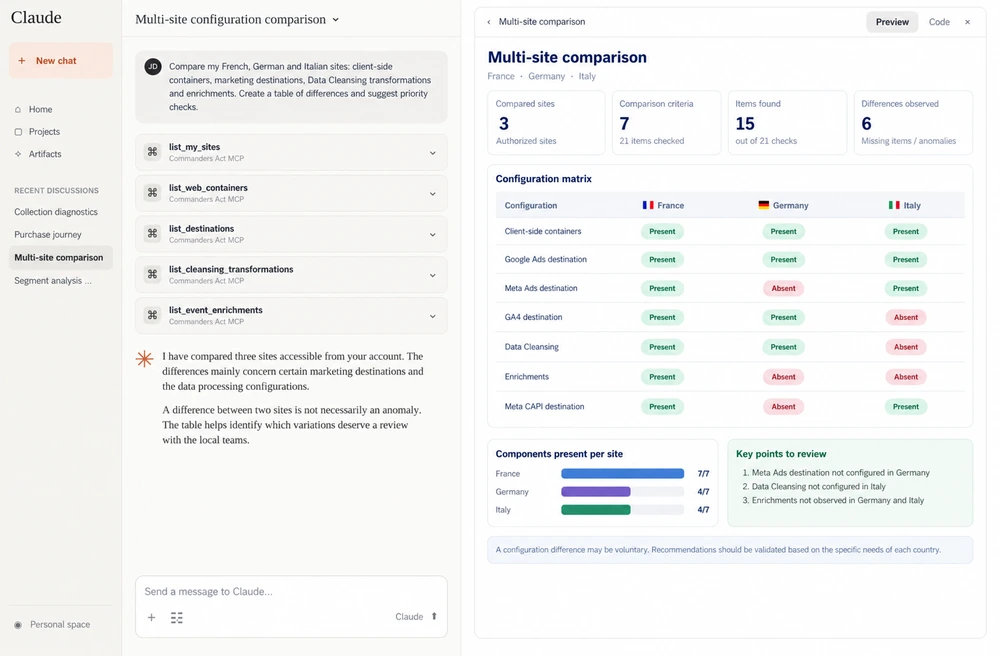
5- Align tracking across your multi-country sites
Compare the configurations of your French, German and Italian sites: destinations, containers, server-side setups. The AI generates a matrix of the gaps to review first.
The benefit: simpler multi-site governance, ideal for international teams and agencies.
6- Prepare a cookie and privacy review
The assistant analyzes your latest cookie scanner results and privacy statistics. It groups detected cookies by vendor and flags those that need checking. It then prepares a prioritized compliance review checklist, available as a filterable dashboard.
The benefit: a compliance review prepared in minutes, so you can approach discussions with your DPO or legal team with confidence.
AI-generated dashboards and interactive pages
Depending on your assistant’s features, answers can take the form of:
- comparison tables,
- charts,
- flow diagrams,
- dashboards,
- interactive HTML pages with filters.
The MCP server provides the data; the AI assistant creates the visualization.
You can then refine the results in the same conversation: “Focus on reactivation audiences”, “Add a chart by marketing objective”, “Summarize these insights for my team”.
How to access the Commanders Act MCP server
The Commanders Act MCP server was launched as a closed alpha on April 1, 2026. It is now in closed beta, with a limited number of users.
What you need to know:
- 35+ tools cover sources, destinations, tag management, monitoring, reports and administration.
- Compatible assistants include Claude and ChatGPT.
- The connection is secure via OAuth 2.1: each user only accesses the data allowed by their Commanders Act permissions.
To join the waiting list, contact our support team.
→ Read the Commanders Act MCP server documentation, prompts examples included.
Frequently asked questions
Can the MCP server change my configuration?
No. In closed beta, it is used to read and analyze configurations, reports and monitoring data. It does not publish tag changes or create campaigns.
Is my data secure?
Yes. Authentication relies on OAuth 2.1 and a browser-based login. No token is handled manually, and access follows your account permissions.
Do I need technical skills?
No. Once the connector is set up, you simply interact in natural language.